Tracking your team's stats involves accumulating series results for all games you play plus all the games your opponents play. This has to be done in a separate directory from the one where games are played since the stats are reset before each series. That is the purpose for the second directory we created in the setup, the NARC Stat directory.
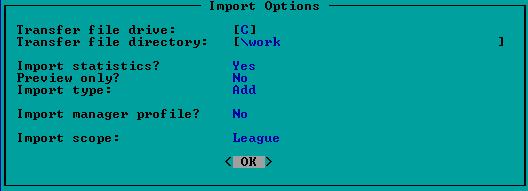
First, we will address the accumulation of stats for games played by you. Once the series zip file is created and before the you delete the statistic export files, restart the game and activate the NARC Stat directory. Return to the main menu and select (T)ransfer -> (S)tat/MP -> (I)mport. You will be presented with an Import Option window.
You have an option with the Scope setting. If you are only interested in your own team's stats, then set the scope to "Team", choose "OK", and then select your own team. If you are also interested in accumulating the stats of your opponents as they played against you, then set the scope to "League" and choose "OK". Since there are only export files for two teams, the later option will bypass every team except yours and your opponent's team.
After the import is complete, make sure you get a message to confirm the import was free from any unexpected error. Once the import process is successfully completed, return to the main menu and reactivate the NARC Player directory. Do this immediately so you don't become confused over which directory is active.
The last part of the import process is only required if you wish to retain the box scores and score cards of every game. If this is not the case, then exit DMB and return to the process of reporting series results. Retaining the box scores and scorecards is as simple as moving them from the Work directory to the NARC Stats directory. As was the case of getting these files (GMxxxxyy) to the Work directory, you can use either the DOS Move command or simply drag and drop the files in Windows.
The second part of the accumulation of stats is importing results from the games played by your opponent. Each series should be downloaded from the web site. You will receive an e-mail message each time results are posted by your opponents. Save each of these result ZIP files, one at a time, in your Work directory.
Once a ZIP file is in your Work directory, use your favorite ZIP utility to uncompress the ZIP archive into its component parts. Once the export files are available, you can use the same procedure documented above to import the stats. Once the import is completed, you should clean out the Work directory.