Playing a Series
Before you begin any series, it is extremely important that all
statistics are reset to zero. This is necessary due to the way NARC
accumulates statistics on the web site. Each series stands by itself.
There is only *ONE WAY* to make sure this is done correctly. From
the DMB main menu select (P)lay -> (B)egin. Before doing this, you
should verify that your Active directory is the NARC Player directory.
At the same time, you should also verify that your Working directory
is empty.
To start playing a game, go to the DMB main menu and select (P)lay ->
(S)cheduled -> (O)neGame -> {select series}. Doing this will present
you with the following window of Game options.
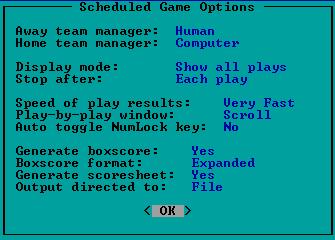
Away/Home team managers should be set to your preference and the
preference of your opponent (as provided in the series instructions).
Display mode is most commonly set to "Show all plays" with the Stop
option set to "After each play" so you can stay in touch with the
details of the game. If you are just blowing through games with both
teams managed by the computer, then this option should be set to "Show
linescore" and the Stop option should be "Game is over". The next
section on speed and scrolling is all personal preference with some
determination being made by the speed of your computer. Typically,
"Very Fast", "Scroll", and "No" are reasonable settings.
The last section of this window deals with creating appropriate game
documentation. The options should be set to create both a box score
(in expanded format) and scoresheet and send these to a DMB created
file automatically at the end of the game. These files are stored in
the NARC Player directory, begin with a "GM" and do not have any file
extension. Once this is done once, the settings will remain in affect
unless you change them. So, you only need to do this for the first
game you play. After that, you should just verify that the settings
are indeed what you expect.
Choose the pitchers and lineups and play the game. At the end of the
game you will be presented with a menu. Make sure to (U)pdate the
stats before exiting the post game menu. There is NO need to manually
create the box score or scoresheet since it is being created
automatically via the game options.
Repeat this process for each game in the series until the series is
completed.
Return to Help Menu.
Return to NARC Home Page.